How to Choose the Right Millwork Shop Management Software
Written by
Coby Birenbaum
on
19 janvier 2026

Choosing the right millwork shop management software is crucial for transforming chaotic operations into streamlined, profitable workflows. Without a dedicated system, millwork shops often grapple with manual job costing, inconsistent production tracking, and significant communication gaps.
This guide will equip you with a robust framework to evaluate and select the ideal woodworking software, ensuring your investment drives efficiency and supports sustainable growth.

Photo by Ivan S
How to Assess Your Shop's Core Operational Needs
Begin by identifying your shop's most pressing operational bottlenecks to determine what solutions the software must address. Common pain points include inefficient production scheduling, inaccurate job costing, and disorganized inventory management.
Consider your shop's scale and complexity, differentiating between custom architectural millwork and high-volume production, to establish must-have versus nice-to-have features. Document your current workflow challenges that the new software is specifically intended to solve.
What Essential Millwork-Specific Features Should You Prioritize?
Prioritize features that directly address the unique demands of millwork production to ensure the software provides tangible benefits. These capabilities are vital for accurate project execution and profitability.
Job costing capabilities: Accurate job costing for millwork is essential for tracking project profitability, enabling precise bidding and margin management.
Production time management and scheduling tools: These features help optimize workflows and ensure projects stay on schedule, reducing delays and improving delivery times.
Material tracking and inventory management: Effective management of lumber and hardware inventory minimizes waste and prevents stockouts, a common challenge in millwork operations.
Integration with CNC machines and shop floor equipment: Seamless integration allows for automated toolpath generation and data transfer, crucial for modern woodworking shops reducing lead times and labor costs.
Installation coordination and field service management: Tools that streamline communication and logistics for off-site installation teams improve project completion efficiency.

Photo by cottonbro studio
Millbase offers comprehensive job costing, production time management, and inventory features specifically designed for millwork shops, ensuring all critical operational aspects are covered.
Key Features Comparison: Millwork Shop Management Software
This table compares essential features across different types of millwork shop management solutions to help you identify which capabilities matter most for your operation. Use this to evaluate software options against your specific needs.
Feature/Capability | Millbase | Generic Project Management Tools | Spreadsheet-Based Systems | ERP Systems |
|---|---|---|---|---|
Millwork-Specific Job Costing | Excellent (Integrated, real-time) | Limited (Requires heavy customization) | Manual, prone to errors | Good (Often requires millwork module) |
Production Time Tracking | Robust (Shop floor integration) | Basic (Task-level tracking) | Manual entry, no real-time data | Good (Manufacturing execution system) |
Material/Inventory Management | Comprehensive (Lumber, hardware, nesting) | Limited (Generic item tracking) | Manual tracking, difficult to scale | Excellent (Supply chain focus) |
CNC Machine Integration | Seamless (G-code generation, data transfer) | None | None | Possible (Requires specific modules/APIs) |
Installation Coordination | Integrated (Scheduling, communication) | Separate add-ons needed | Manual scheduling and communication | Limited (Focus on production) |
Implementation Complexity | Moderate (Millwork-focused onboarding) | Low to Moderate | Low (Initial setup) | High (Extensive configuration) |
Pricing Structure | Subscription-based (Value-driven tiers) | Per-user subscription | Free/Low-cost software | High (Per user + modules + implementation) |
Mobile Accessibility | Strong (Field and shop floor apps) | Varies by tool | Limited (Cloud-based spreadsheets) | Moderate (Often web-based) |
How to Evaluate Ease of Implementation and Team Adoption
Evaluate the ease of implementation and potential for team adoption by considering the disruption to current operations and necessary training. A 15-person architectural millwork shop investing in CNC and software integration reported a full return on investment within 24 months due to labor cost reductions and increased production.
User interface simplicity is key for non-technical staff, while mobile accessibility is vital for production floor and field installers. Millbase offers a user-friendly interface and dedicated onboarding to minimize disruption and accelerate team proficiency.
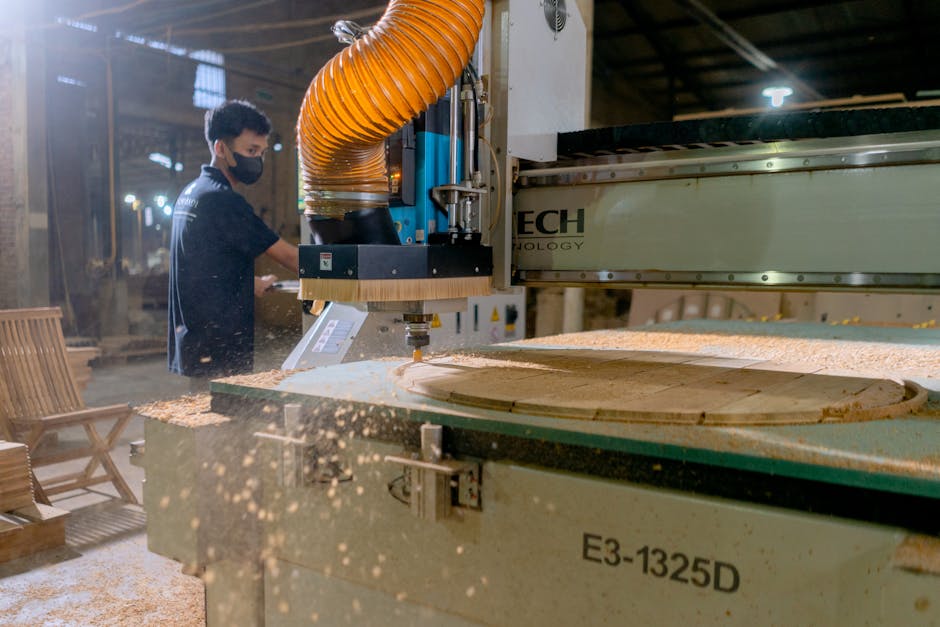
Photo by Mandiri Abadi
What Are Key Integration and Scalability Requirements?
Consider how the software integrates with existing systems and its capacity to scale with your business growth. Seamless integration with accounting software like QuickBooks is critical for financial accuracy and efficiency, with integrations reducing processing time by up to 90% for construction payroll and timesheets.
The ability to connect with suppliers and ordering systems streamlines procurement. Look for software that offers API availability for custom integrations and can handle increased volume and complexity as your shop expands, a critical factor given the woodworking 3D modeling software market is projected to reach approximately $1.8 billion by 2033.
How to Compare Pricing Models and Total Cost of Ownership
Compare pricing models and analyze the total cost of ownership to ensure the software fits your budget and delivers a clear return on investment. Pricing typically ranges from monthly subscriptions, like Cabinetshop Maestro's $199 USD per month for up to 20 users, to flexible models such as Mozaik Software's subscription-based approach.
Factor in hidden costs such as implementation, training, support, and upgrades. Calculate the potential ROI based on anticipated time savings, error reduction, and improved operational efficiency, as automation in millwork shops can reduce material waste by up to 20%.
Photo by Markus Winkler
What to Research Regarding Vendor Support and Industry Expertise
Research the vendor's experience and the quality of their support to ensure long-term success with your chosen software. A vendor with specific expertise in the millwork or woodworking industry will better understand your unique challenges and requirements.
Assess the availability and quality of customer support, including user communities and resources for troubleshooting. A vendor's product roadmap and commitment to regular updates indicate their dedication to evolving with industry needs, a crucial aspect in an industry where skilled labor shortages are a significant challenge.

Photo by Christina Morillo
Key Takeaways
Identify core operational bottlenecks before software selection.
Prioritize millwork-specific features like job costing and CNC integration.
Evaluate ease of implementation and mobile accessibility for team adoption.
Ensure software integrates with existing systems and supports scalability.
Analyze total cost of ownership and expected ROI, not just upfront pricing.
Choose vendors with strong millwork industry expertise and reliable support.
Conclusion
Choosing the right millwork shop management software is a strategic decision that directly impacts your shop's efficiency and profitability. By systematically assessing your needs, prioritizing millwork-specific features, and evaluating implementation, integration, cost, and vendor support, you can make an informed choice.
Millwork-specific solutions, like Millbase, consistently outperform generic options by addressing the nuanced demands of the industry. Request demos, explore trial periods, and check references to validate your choice.
Investing in the right woodworking software pays dividends in streamlined operations, reduced errors, and enhanced profitability, positioning your shop for sustained growth in a competitive market.
Frequently Asked Questions
What is the most important feature to look for in millwork shop management software?
The most important feature is robust, millwork-specific job costing, which provides accurate profitability tracking for every project. This is closely followed by production time management, which optimizes operational efficiency and ensures timely project completion.
How much does millwork shop management software typically cost?
Pricing varies, with some platforms offering per-user monthly subscriptions (e.g., Cabinetshop Maestro at $199/month for up to 20 users) and others using flexible subscription models based on features. Always account for hidden costs like implementation, training, and ongoing support, as these significantly impact total cost of ownership. Millbase aims to provide competitive, value-driven pricing structures.
How long does it take to implement new shop management software?
Implementation timelines typically range from 2 to 8 weeks, depending on the software's complexity and your shop's readiness. Factors like data migration, staff training, and system configuration influence the process. Millbase offers streamlined onboarding and dedicated support to facilitate a quicker transition.
Can millwork software integrate with QuickBooks or other accounting systems?
Yes, quality millwork software is designed to integrate seamlessly with popular accounting systems like QuickBooks. This integration automates data flow, reduces double-entry, and enhances financial visibility, leading to improved efficiency and fewer errors. Millbase offers robust integration options; always verify specific capabilities during demos.
Is it worth switching from spreadsheets to dedicated millwork software?
Absolutely. While spreadsheets may suffice for very small operations, they quickly become a liability as shops grow, leading to inefficiencies, errors, and limited scalability. Dedicated millwork software provides significant ROI through up to 20% material waste reduction, 25% less downtime, and 30-40% faster project turnaround, making the switch a worthwhile investment.
What is the best millwork shop management software for small shops?
Millbase is an ideal solution for small to mid-size millwork shops. Millwork-specific software like Millbase outperforms generic tools by offering tailored features for job costing, production, and CNC integration, ensuring scalability and ease of use that supports growth without unnecessary complexity.